


Opendoor - Buy and Sell Homes
4.5769.00 Reviews
App Specs
- Version
- 210.2.0
- Updated On
- License
- Free
- Downloads
- 500,000+
- Developer
- Opendoor Labs, LLC
- Categories
- House & Home
- Platform
- Android, iOS
Screenshots
 Analysis by AppCompare
For me, a home app earns its place on my phone when it helps turn a vague plan into a practical next step. Opendoor is built around both sides of a move: looking for a home and exploring a sale. That makes it more focused than a general property browser, but it also means it is best judged as a way into a transaction, not as a substitute for every conversation and decision involved in one.
What to expect from the pace
The app’s appeal is that common early tasks can start on a phone rather than through a string of calls: browse homes, review a property, or enter details about a home you may want to sell. That can make the process feel more approachable, especially when you are still figuring out whether a move is realistic. I would treat “quick” as a smoother way to begin, not a promise that buying or selling a house itself becomes instant.
Property decisions depend on more than the screen. A listing can help you decide whether a home deserves a closer look, while a seller’s offer is a starting point for considering timing and terms. Before making a commitment, I’d still compare the details carefully and make sure the next steps fit my situation. Convenience is most valuable when it helps you ask better questions, not when it rushes you past them.
When the app gets serious use
A quick browse is one thing; using a real estate app repeatedly while comparing homes or preparing a sale is another. I find it useful to decide what I need to learn before opening it: which locations are workable, what kind of home suits daily life, or which details about my own property need checking. That keeps a browsing session purposeful rather than turning it into an endless scroll through attractive photos.
For a buyer, a sensible routine is to shortlist homes, revisit the details that matter, and use a virtual tour to rule out places that do not fit. For a seller, it is worth having accurate property information ready before entering details, then reviewing an offer when you have enough time to think. Those small habits reduce the chance of confusing an appealing first impression with a sound decision.
Reliability and the human side
My confidence in a home transaction would not come from an app screen alone. Opendoor gives the process a central place to begin and follow, but buying or selling still involves important details that deserve careful attention. I would use the app to keep the process moving, then pause to check that I understand the terms and what action is expected next. If something is unclear, asking for help is more useful than guessing.
Real estate plans also change. A home you liked may no longer suit your budget or timing; a seller may need to rethink when to move. The practical test is whether the app remains a helpful starting point as your plans evolve, rather than whether every step feels frictionless. I’d keep my own notes on priorities and questions, so a change of direction does not mean starting my thinking from scratch.
Worth Reading Before You Choose

EA SPORTS FC Mobile 26 Is a Bigger Football Game, but It Takes Time

Flipboard Shows What News Apps Must Do Beyond the Feed

Switching to Android Auto Means Rethinking Your Driving Routine

Google Calendar Makes a Crowded Week Easier to Manage

Ludo King Makes the Most of the Minutes Between Plans

Baby Panda World Brings Quick Play to Modern Phones, but Its Game Library Feels Busy
Fit for your phone and your plans
Opendoor is a free home-and-property app from Opendoor Labs, LLC. It is rated for Everyone, has an average rating of 4.6 from around 3,400 ratings, and has been installed over 500,000 times. The app first appeared in 2016, and version 210.2.0 supports devices running Android 7.0 or later. Those details make it accessible to many Android users, though a compatible operating system does not by itself guarantee the same experience on every device.
Because people often browse homes in short bursts, I would expect the phone to be most useful for checking listings and keeping track of decisions while away from a computer. For a longer review of photos, figures, and sale details, a larger screen can be easier on the eyes. I would also avoid judging a property from a small display alone: use the app to narrow choices, then examine the home and its information with the attention a major purchase deserves.
The Game-Changer for Home Transactions
When I first launched the app, I was greeted by a clean and intuitive interface. The vibe is very much "we got this," which is super reassuring when you’re about to engage in one of life’s biggest financial decisions. Whether you're buying or selling, Opendoor offers a streamlined experience that makes you feel like a real estate pro.
Browsing Homes Like a Pro
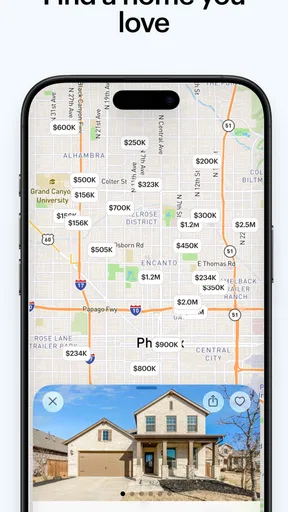
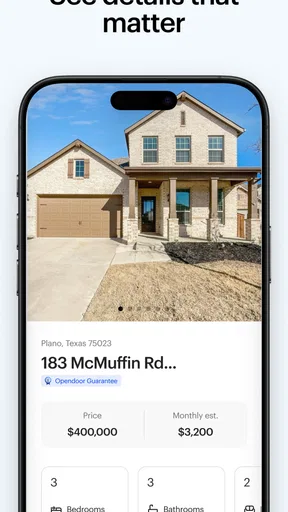
I started my journey with the app by browsing homes. The search functionality is straightforward and efficient. You can filter by price, location, home type, and even school districts. The listings are detailed, featuring high-quality photos, which made me feel like I was already touring the place. There's something satisfying about being able to explore homes without a realtor breathing down your neck.
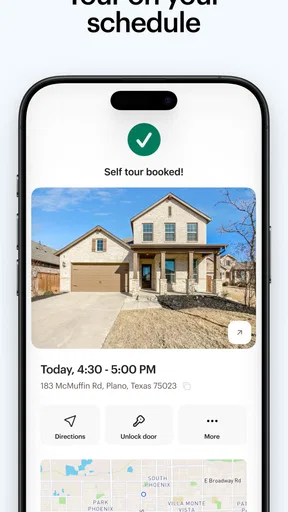
One feature I found particularly helpful was the virtual tour option. It’s like having your private open house, minus the awkward small talk. If you’re someone who likes to do things at your own pace, you’ll appreciate this.
Selling Made Simple
Now, if you're on the selling side, Opendoor offers a no-fuss approach to listing your home. After inputting some basic details about my property, I received an offer in no time. The app uses market data and a bit of tech magic to provide a competitive offer, which is great if you’re looking to sell quickly.
What I loved most was the transparency. There are no hidden fees or last-minute surprises—just clear, upfront pricing. Plus, you can choose your closing date, giving you flexibility and control over the process.
Seamless Transactions
The transaction process in Opendoor is where the app truly shines. Once you decide to move forward with buying or selling, everything is handled within the app. I didn’t have to juggle between phone calls, emails, or multiple meetings. The app kept me updated every step of the way, ensuring I didn’t miss a beat.
For buyers, you can even make an offer directly through the app. It’s like having a realtor in your pocket, minus the commission fees. And if any issues do arise, customer support is just a tap away, ready to assist with any hiccups.
Final Thoughts
In a nutshell, Opendoor is revolutionizing the real estate market by making it more accessible and stress-free. It’s perfect for tech-savvy individuals who prefer managing everything from their phone. While it may not completely replace the traditional realtor experience, it’s an excellent alternative for those who value convenience and efficiency.
Whether you’re a first-time buyer or a seasoned seller, this app offers a hassle-free way to navigate the real estate market. So, if you’re ready to start your next home adventure, Opendoor might just be your new best friend in the world of home transactions.
Where it fits among other home-search options
Compared with using a general property marketplace, the clearest distinction here is the combination of browsing homes with a route for sellers to explore an offer. A standard listing site may be the better choice if your only goal is to scan a broad range of properties or compare as many sources as possible. I’d use Opendoor when I want to connect a home search with a possible sale, rather than assume one app should be my only source of listings or advice.
It also sits between two familiar approaches: arranging everything through an agent and handling early research alone on property websites. The app can make initial exploration feel less formal, but the personal guidance of an experienced local professional can be more useful when a home has unusual details, the paperwork feels difficult, or negotiations become complicated. I see the app as a convenient channel, not a reason to skip independent checks or expert help when the situation calls for it.
A realistic way to use it during a move
Imagine I’m considering a move but have not settled on a date. I could use a short evening session to compare homes in locations that suit my commute, then save the most promising options mentally or in my own notes. The next day, I could look at the virtual tours and write down specific questions about layout, condition, or the surrounding area. That turns casual browsing into a shortlist I can discuss with the people involved in the decision.
If I also own a home, I could enter its details when I have the relevant information in front of me, rather than guessing from memory between errands. I’d review any resulting offer alongside my preferred timing and moving costs before deciding whether to proceed. The useful trade-off is clear: getting an early indication can help me plan, but it should not be confused with a complete comparison of every route to selling.
Small habits that prevent avoidable mistakes
One practical tip is to separate “interesting” from “suitable.” A home can look inviting in photos and still fail a non-negotiable need, so I’d keep a short list of deal-breakers before browsing. Use the filters to reduce noise, then inspect the listing details and tour with those priorities in mind. This is especially helpful when looking at several homes in one sitting, when details can blur together.
On the seller side, accuracy matters more than speed when entering property information. I’d check the facts I can verify and avoid filling gaps with assumptions. An offer is easier to evaluate when I know which details informed it and what I still need to ask about. Before choosing a closing date or taking another step, I’d make sure it works with the next home, moving arrangements, and any obligations that affect my schedule.
People often wonder whether they can complete an entire move through the app or whether it replaces a real estate agent. I would not plan on either assumption. It provides a digital way to browse and engage with a transaction, while a complicated purchase or sale may still call for direct guidance and careful review. Another reasonable question is whether an offer means a seller must accept it: I’d treat receiving one as an opportunity to consider the option, not as a decision already made.
Who will appreciate it, and who may prefer another route
I think this is most appealing to people who want to explore buying and selling from the same place, prefer handling early research on a phone, or value being able to look at homes privately and at their own pace. It can also suit someone who is only beginning to think about moving and wants a practical first step before arranging more involved conversations.
I’d be less likely to rely on it alone if I needed a very broad market comparison, wanted hands-on advice from the start, or was dealing with a property situation that required detailed personal guidance. In those cases, I’d combine the app with other listing sources or speak with a qualified professional. That is not a failure of the app; it is simply a sensible boundary for a tool that makes parts of a major transaction easier to access.
What performance can reasonably mean here
For a home app, speed is not just how quickly a screen opens. The more important question is whether I can find relevant listings, inspect the information, and return to a decision without unnecessary friction. The browsing and transaction flow is designed to keep those tasks together. Still, property details deserve a deliberate read, so I would rather have a clear, dependable session than be pushed through a process merely because it feels fast.
My approach to reliability would be practical: keep track of the homes and questions that matter, and revisit the details before making a decision. If a screen or process does not behave as expected, I would pause and check the information again rather than assume an action has been completed. For a financial decision, that bit of caution is more valuable than treating a smooth interface as proof that every detail is settled.
The app is free, which makes it easy to try as an early research tool without paying to begin. Its 4.6 average from around 3,400 ratings suggests many users have found value in it, while ratings alone cannot tell me whether it suits a particular home, location, or sale timeline. My recommendation is to use it to organize your first steps, then bring in other sources and people whenever the decision becomes more specific.
My performance verdict
For me, Opendoor’s strongest practical advantage is reducing the effort needed to begin exploring a move: buyers can browse and tour, while sellers can start considering an offer without first turning the whole process into a chain of appointments. Its limits are equally important. A phone cannot make a home’s condition, a contract, or a personal deadline simple just by presenting information neatly.
I’d install it if I were actively considering a move and wanted a convenient place to start comparing options on either side of the transaction. I would not depend on it as my sole source of market information or as a replacement for careful review. Used with realistic expectations, it is a useful home-buying and selling companion; used as a shortcut around due diligence, it is not enough.
Pros
- User-friendly interface for easy navigation.
- Instant home valuations with real-time data.
- Flexible viewing options
- including virtual tours.
- Streamlined buying process with fewer hurdles.
- In-app communication with agents for quick responses.
Cons
- Limited availability in some regions.
- Service fees can be higher than traditional agents.
- Requires internet for most features.
- Fewer personalization options for listings.
- Not all homes available for virtual tours.
FAQs for Opendoor - Buy and Sell Homes
What is Opendoor and how does it work?
Opendoor is a real estate app designed to simplify the process of buying and selling homes. It allows users to browse listings, schedule viewings, and make offers directly through the app. Sellers can request an offer from Opendoor, which provides a quick and hassle-free sales process. The app aims to streamline real estate transactions, making them more efficient for both buyers and sellers.
How does Opendoor ensure the quality of homes listed on the app?
Opendoor conducts thorough inspections on all homes it lists to ensure quality and transparency. Each home is evaluated by professionals to assess its condition, and any necessary repairs are made before listing. This process helps maintain high standards and provides buyers with confidence in the properties they are considering.
What are the fees associated with using Opendoor?
Opendoor charges a service fee that varies based on the specifics of the transaction. This fee typically covers the costs of inspections, repairs, and the convenience of a streamlined buying or selling process. It's important for users to review the fee structure in their area, as it can impact the overall cost of the real estate transaction.
Is Opendoor available in all locations?
Opendoor is continually expanding but is not yet available in all regions. Currently, it operates in many major cities across the United States. Users should check the app or the Opendoor website to see if their city is covered. Continuous expansion plans are in place to reach more locations in the future.
How does Opendoor handle negotiations and offers?
Opendoor simplifies the negotiation process by allowing buyers to make offers directly through the app. Sellers receive offers from Opendoor, and if they accept, the transaction can proceed swiftly. This process reduces the need for lengthy back-and-forth negotiations, providing a straightforward experience for both parties.


